
VIMS EHSVIMS EHS

Lone worker safety: employer duties and protection systems — dedicated device or smartphone app?

Lone working means any work done without direct visual or voice contact with colleagues — in the field, on night shifts, in remote parts of a site or at a customer's premises. Protecting lone workers means making sure that after a fall, loss of consciousness or threat, someone finds out quickly and can respond effectively.

In lone working the greatest danger is often not the incident itself but the time that passes before anyone knows about it. We explain what regulations expect, how to build an alarm procedure and how to choose between a dedicated device and a phone app.

  • Lone worker
  • Lone working
  • Man-down
  • SOS alarm
  • Risk assessment

Published: 2026-10-04 · Updated: 2026-10-04 · 10 min · Varilo deployment team

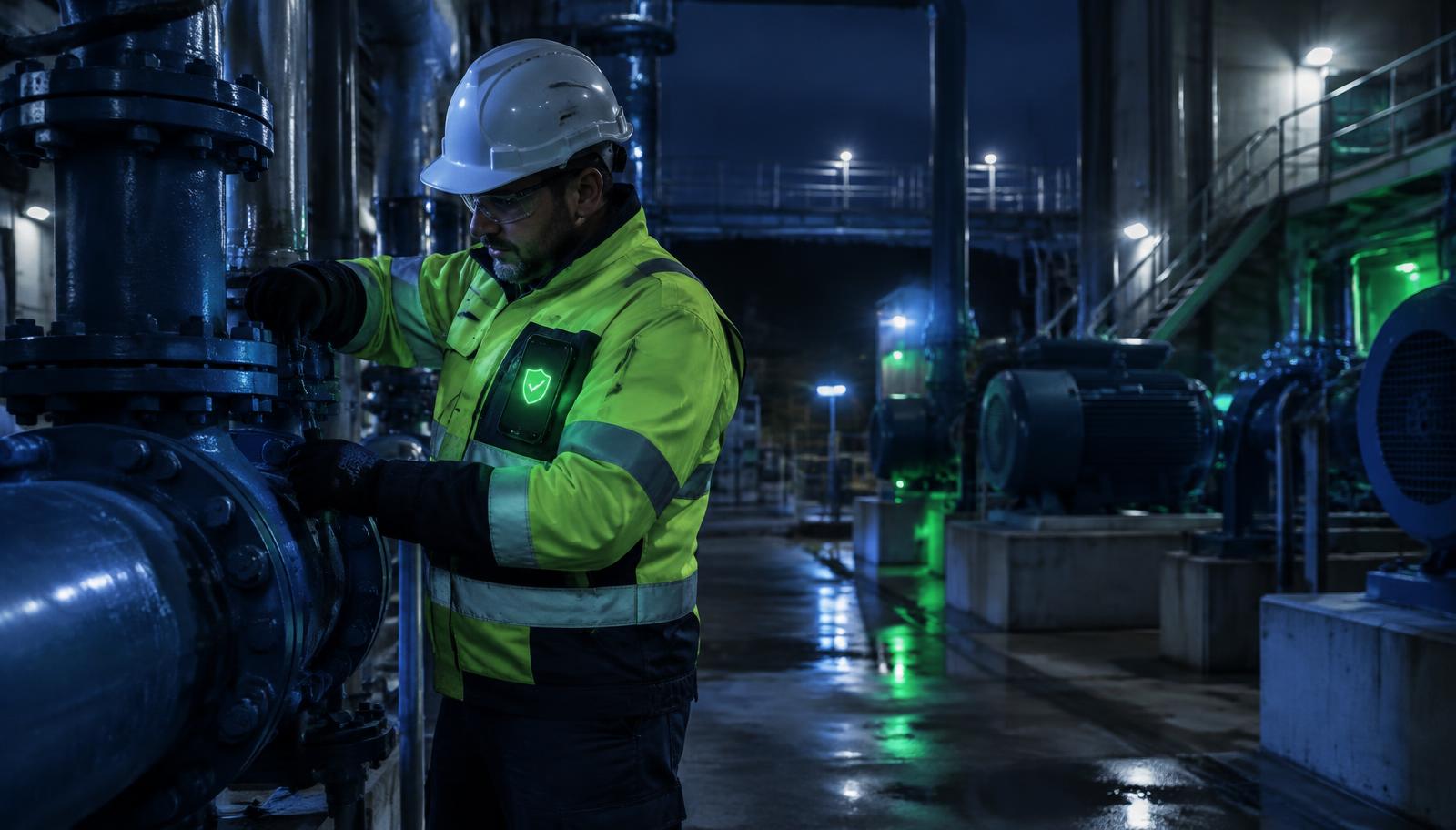
Maintenance technician working alone at night in a pump station, with a phone running VIMS EHS lone worker protection in his jacket pocket

Who is a lone worker?

Lone working is not limited to extreme cases. It covers field service engineers, maintenance staff on late shifts, water and wastewater operators, cold store warehouse staff, security, drivers, utility workers, agricultural and forestry workers and after-hours cleaning staff.

The common factor: if something goes wrong, nobody nearby notices and calls for help. "Call me when you're done" works while everything goes to plan — and fails exactly when the worker cannot make the call.
Lone working and regulations: what is expected of employers?

Most jurisdictions do not ban lone working outright, but employers must protect workers' health and life, assess risks and implement suitable controls. Regulations often require at least two people for particularly hazardous work, such as confined space entry, some work at height or work on energised equipment — there no electronic system replaces a second person.

Elsewhere, the risk assessment decides whether lone working is acceptable and which controls are needed. This guide is informational and is not legal advice — check the specific requirements for each job with your safety professional.

Risk assessment for lone working

Start with an inventory: who works alone, where and how often. For each task assess the likelihood of an event (fall, electric shock, poisoning, heat stress, assault, sudden illness) and how long it could take for help to arrive — often the decisive factor.

The outcome should be concrete controls: no lone working for selected tasks, check-in schedules, an alarm system, procedure training and a named alarm recipient on every shift.

The alarm procedure: the core of protection

No device or app saves anyone without the procedure it triggers. Define who receives alarms, how fast they must respond, what they do when the worker cannot be reached and who takes over when the first person does not answer.

Plan for no signal, flat batteries and false alarms. Rehearse the procedure before go-live and measure the time from signal to confirmed response — the only metric that really shows how effective protection is.

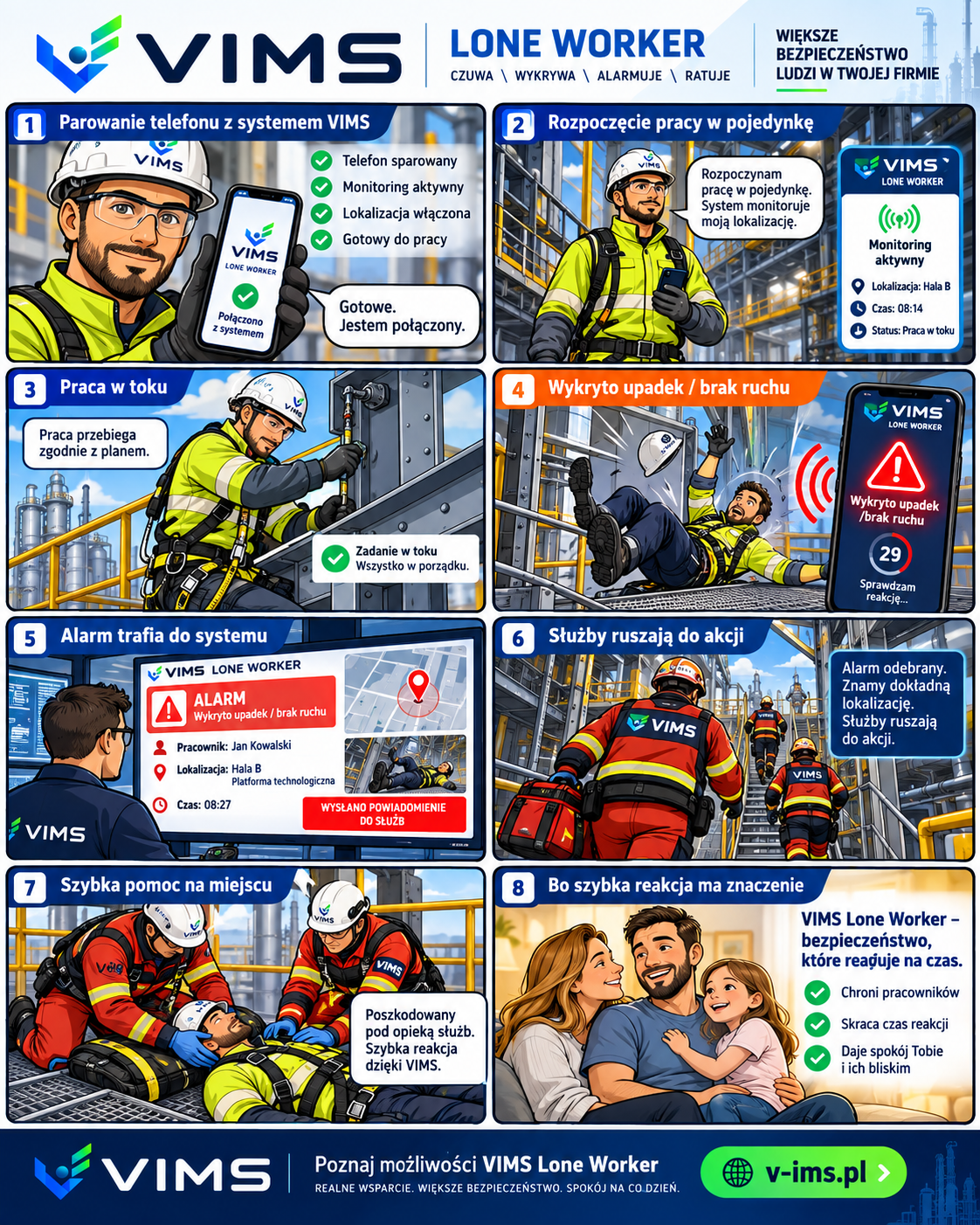
VIMS EHS Lone Worker infographic: 8-step rescue procedure for lone working, from phone pairing to emergency response
The alarm procedure step by step: monitoring, fall detection, duty operator alarm with location and emergency response.

Dedicated lone worker device or smartphone app?

There are two approaches. Dedicated devices worn on a belt or harness often offer specialist features such as gas detection, ATEX versions or satellite connectivity. A phone app uses the motion sensors of a phone the worker already carries to detect falls and inactivity.

Dedicated hardware is the right choice where ATEX certification, gas detection or work without mobile coverage is required. In many other settings — field service, maintenance, security, logistics — an app protects more people faster and at lower cost, without buying and servicing extra devices.

How VIMS supports lone worker protection

The VIMS Lone Worker module runs as an app on the worker's phone: it reacts to falls and prolonged inactivity (with a window to cancel false alarms), and offers an SOS button and scheduled check-ins. Location is captured at the moment of an alarm or check-in, not as continuous tracking.

Alarms go to named recipients with escalation, and the alarm and response history stays in the system as evidence the procedure works. A confirmed event can move into the incident register, root cause analysis and corrective actions — in the same system as your risk assessment. The module is in beta and does not replace supervision required by law.

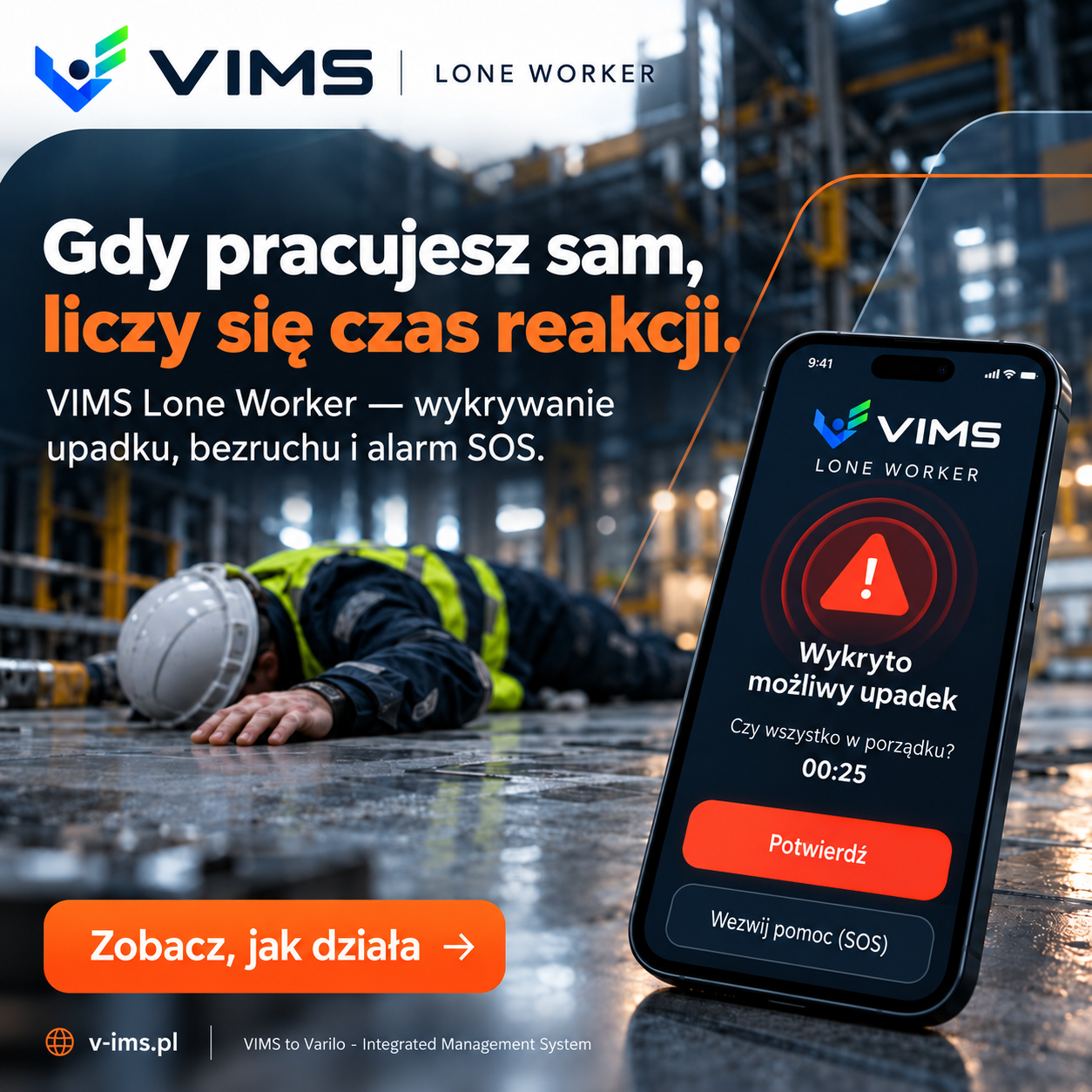
VIMS EHS Lone Worker app detects a lone worker fall and counts down to an SOS alarm
Fall detection: the worker has a moment to cancel a false alarm.
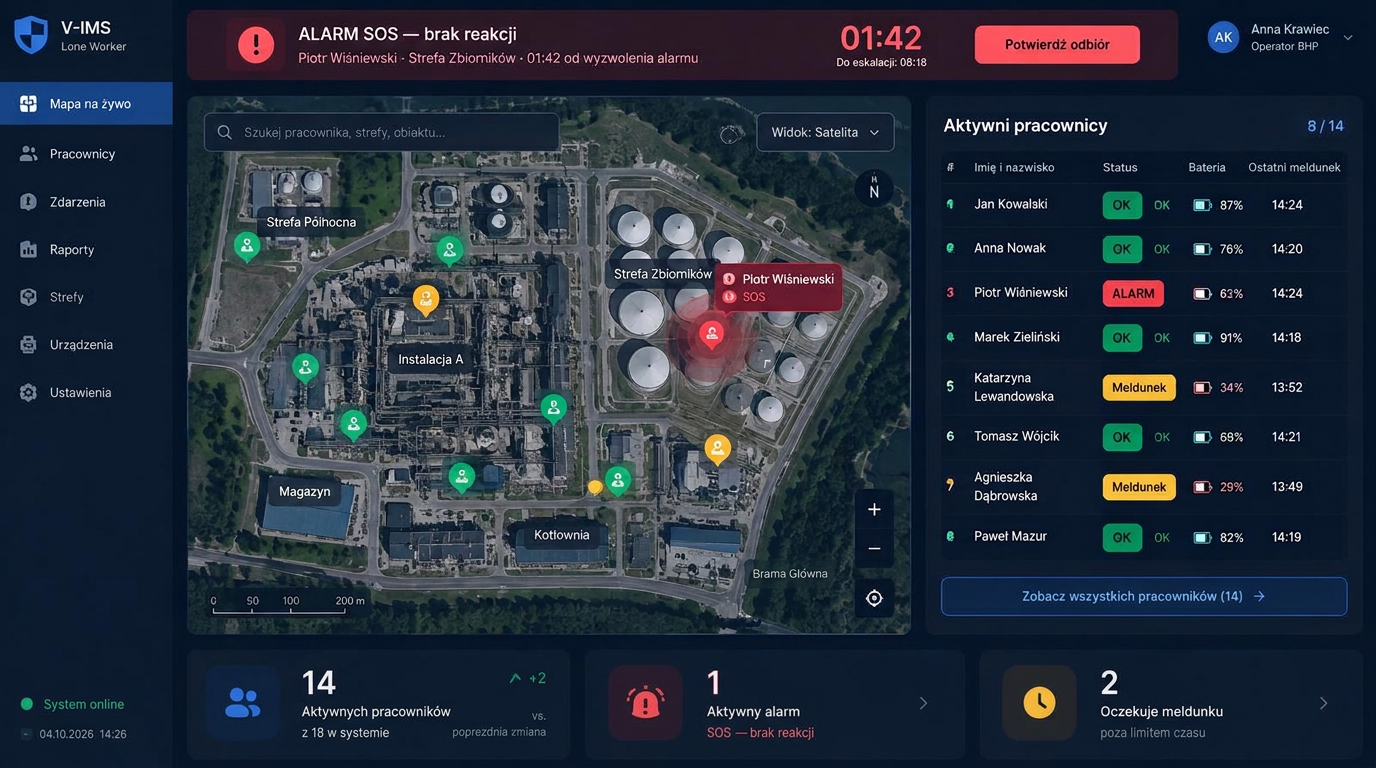
VIMS EHS Lone Worker operator console with site map, active workers list and SOS alarm
Duty operator console: map, check-in statuses and an alarm with escalation timer.

5. Glossary: lone worker, device, app, monitoring centre

Lone worker describes both the person and a category of protection systems: dedicated devices (personal units with SOS and man-down), smartphone apps and alarm receiving centre (ARC) services that receive and escalate alarms around the clock.

A check-in is a periodic confirmation by the worker that all is well; a missed check-in triggers an alarm. A QR/NFC point records the worker's zone where GPS fails — in halls, basements and tunnels.

An alarm response procedure defines who receives the alarm, how the situation is verified (call, second person), when emergency services are called and how the event is recorded. Without it, no device or app provides real supervision.

Dedicated lone worker device vs VIMS smartphone app

The comparison is indicative — specific devices and offers differ in features and price.

CriterionDedicated device (hardware)VIMS Lone Worker app
Entry costDevice purchase, often plus chargers and subscriptionsSubscription per protected device, no hardware purchase
Time to deployOrder, delivery, configuration and issuing hardwareInstall the app and configure alarm recipients
Worker convenienceExtra device to wear and chargeThe phone the worker already carries
Specialist featuresPossible: gas detection, ATEX, satelliteFall, no-motion, SOS, check-ins, location on alarm
ScalingEach new person means buying another deviceAdd a device within the plan or per extra device
Link to EHSUsually a separate system or vendor portalAlarm can feed incident register, RCA, CAPA and risk assessment
Best fitEx zones, gases, no GSM coverageField service, maintenance, security, logistics

Key takeaways

  • In lone working, the time from incident to help is critical.
  • The risk assessment decides whether lone working is acceptable — where rules require a second person, no system replaces them.
  • The alarm procedure (who responds, how fast, who covers) matters more than the device.
  • Dedicated devices suit Ex zones and gas detection; phone apps suit most field and shift work.
  • A documented alarm and response history proves protection works beyond paper.

Frequently asked questions

Is lone working legal?

Generally yes. Some particularly hazardous work must not be done alone; otherwise the employer must assess the risk and provide suitable controls and work organisation.

How do you roll out lone worker protection step by step?

Start with a risk assessment and a list of lone working roles, then set check-in intervals, alarm responders and the escalation path. Train workers and responders, run a test alarm and review the alarm history after the first month. We compare hardware options in “Smartphone App or Dedicated Man-Down Device?”.

Who should receive lone worker alarms?

A person or team available for the whole working time: a dispatcher, security, a shift supervisor or an external alarm receiving centre. The procedure must name a deputy, the maximum response time and the next escalation level if the first responder does not acknowledge.

Does the lone worker app track employees?

In VIMS location is captured at the moment of an alarm or check-in, not as a continuous route log. Discuss data processing rules with your workforce before rollout.

How much does VIMS Lone Worker cost?

It is billed per protected device in Starter, Pro 10 and Pro 25 plans — see the pricing page for current prices.

What is the difference between SOS and man-down?

SOS is triggered deliberately by the worker, e.g. when threatened or attacked. Man-down works automatically when sensors detect a possible fall or no motion — even if the worker cannot call for help.

What is an alarm receiving centre?

A 24/7 service (ARC) that receives lone worker alarms, verifies the event and escalates it under the procedure. The alternative is an internal duty — a dispatcher, security or supervisor.

How is location recorded where GPS fails indoors?

QR or NFC points placed in zones help: the worker scans a point on entry and the alarm shows the last confirmed zone instead of an inaccurate GPS position.

Try lone worker protection on your workers' phones

We show how an alarm from a phone reaches the responder and how a confirmed event flows into the register and corrective actions.