

VIMS EHSVIMS EHS

Which safety management software to choose? 11 questions before buying

Safety management software keeps employee records, training and medical deadlines, risk assessments, incidents, inspections and corrective actions in one place. Choose it for the real problems it must solve, not for the number of features: everyday usability, fit for your organisation's size and control over what happens on the shop floor matter most.

Looking for safety software, a mobile safety app or a full EHS system? Before you compare vendors, work through the 11 questions worth asking before buying — whether you run a small company, a manufacturing plant or safety across several locations.

  • Safety software
  • Choosing a system
  • EHS system
  • QHSE
  • Labour inspection

Published: 2026-10-11 · Updated: 2026-11-01 · 12 min read · Varilo deployment team

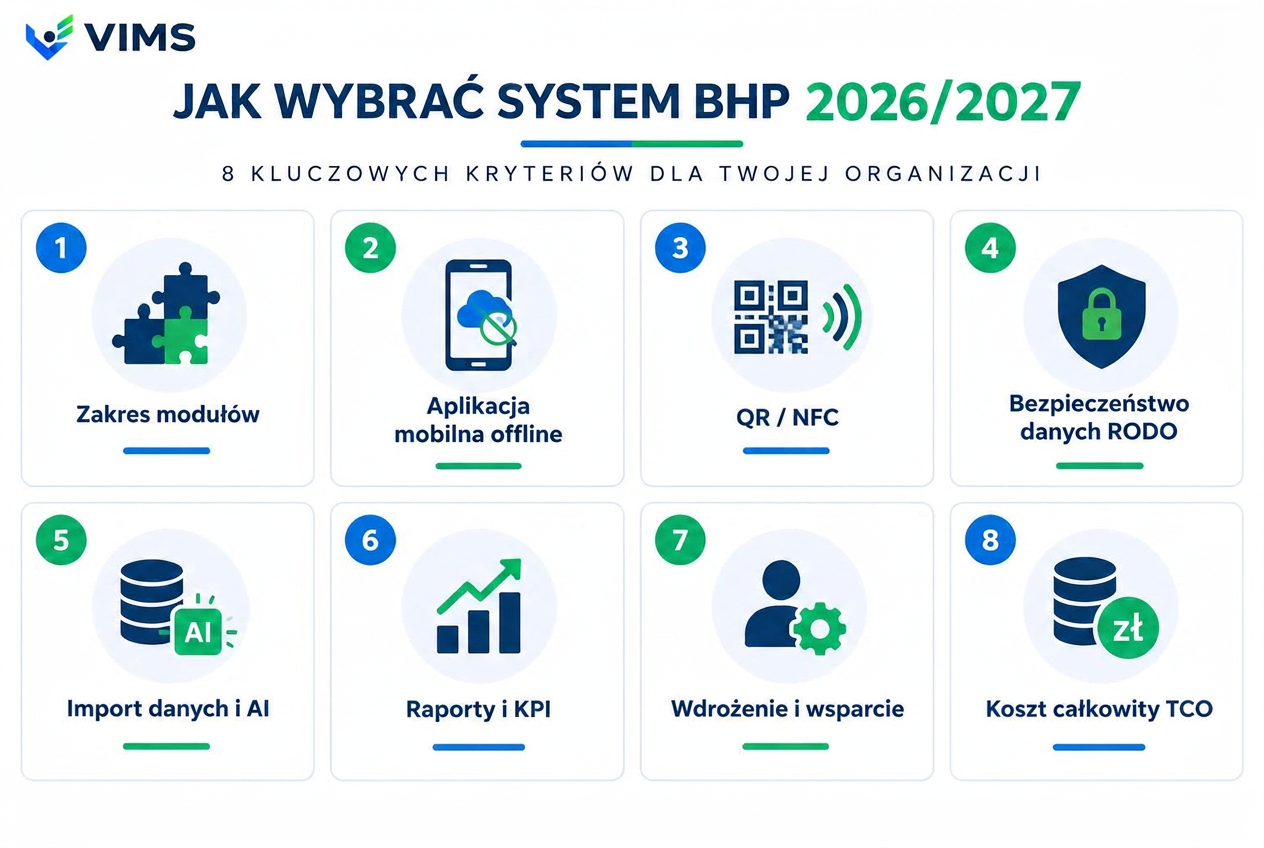
VIMS EHS infographic — criteria for choosing safety management and EHS software in 2026/2027

1. What is the best safety management software for a company?

The best safety software solves your company's real problems, is easy for users to understand and does not add more work than the tools it replaces.

In a small company the priorities are often medical and training deadlines, employee records and risk assessments. In a manufacturing plant the list grows: incidents, hazard reports, inspections, chemicals, contractors and equipment checks.

Before choosing, write down three things: what takes the most time today, which information you search for most often, and which tasks or deadlines you tend to miss.

That is a better starting point than comparing dozens of features, most of which may never be used.

Modern safety software for companies, such as VIMS EHS available at vimsehs.pl, connects basic records with operational processes. Not every company needs every module — start with whatever brings the most visible benefit.
2. Does a small company need safety software?

Not always. A small company can manage safety records without specialised software if it has few employees, simple processes and good control over deadlines.

Problems start when the owner, the person responsible for HR or an external safety specialist has to keep reminding themselves what is due and when.

Imagine a company with 15 employees. There is no dedicated safety department; records are kept by the owner and an external provider. A full EHS system with dozens of functions may be unnecessary there.

What can help is a simple records tool that shows training and medical validity, stores risk assessments and reminds about important deadlines.

Headcount alone should not be the deciding criterion. A small workshop with machinery and hazardous substances can have more complex needs than a much larger office company.

3. How does safety software differ from a safety app and an EHS system?

These terms are often used interchangeably, although they can describe different scopes.

Safety software usually refers to tools for records, training, medicals, risk assessments and registers.

A safety app emphasises phone use — for example reporting hazards, performing checks or accessing workstation instructions.

An EHS system (Environment, Health and Safety) additionally covers environmental matters and organisation-wide safety management; QHSE systems also include quality.

These are not rigid product categories. Always check the actual scope of a given solution.

One example is VIMS EHS — modular safety software and an EHS/QHSE system that connects employee records, risk assessments, incidents, audits, corrective actions and selected technical and quality processes.

For a small company that may mean using only the basic functions; for a large plant, one system spanning several departments.

4. What features should good safety software have?

Not everyone needs the same set, but some areas are worth checking first.

In practice the most common are: employees and deadlines (training, medicals, qualifications), occupational risk assessment (creating, updating, reviewing), incidents and accidents (logging and documentation), hazard reporting (information from employees), inspections and audits (recording findings and non-conformities), corrective actions (ownership and follow-up) and reports (a quick view of safety status).

In more demanding organisations, chemical and SDS registers, machine inspections, workplace exposure monitoring, PPE records and contractor oversight also matter.

More important than the feature list itself: check whether data from one process flows into the next.

If a hazard report must be retyped into an action register and then again into a report, the software has merely moved the paperwork onto a screen.

5. Should a safety app work on a phone and without logging in?

If field workers are expected to use the software, mobile usability is critical — though not every action needs to be login-free.

A safety specialist can work at a computer, but a machine operator, warehouse worker or maintenance technician often cannot.

Imagine a worker who spots an oil leak at a machine. To report it they must find a computer, log in, locate the right module and fill in a long form. Chances are the report ends as a verbal note.

Look for solutions that simplify the first reaction as much as possible.

For example, the VIMS EHS app supports hazard reporting via QR code without logging in. The worker opens a form on the phone and attaches a photo; the rest of the handling happens in the system.

That does not remove the need for secure access to data. Reporting a hazard and reviewing accident documentation are two different permission levels.

6. Is Excel enough, or is online safety software better?

Spreadsheets remain a good tool for simple registers. They start getting in the way when several people are responsible for connected processes, deadlines and actions at the same time.

The number of files is not the problem. The problem appears when it is hard to tell which file is current, who should perform a task or whether the action after an inspection was really closed.

Example: during a walk-through a damaged machine guard is found. The note goes into a spreadsheet, the supervisor gets an email, and the repair deadline lands in another table. Two weeks later someone asks whether the machine was fixed. Where do you look?

Good safety software should let you go from the finding to the task, the owner, the deadline and the confirmation of completion — without hunting through several places.

You do not have to move everything at once. Sometimes it is enough to start with the most painful register.

7. How much does safety software cost?

The cost depends on the scope of functions, number of users, locations, licensing model and deployment terms. The cheapest subscription is not always the lowest total cost.

Before buying, check: do you pay per employee, admin user, location or module; are deployment and data import charged extra; do mobile access, reports or notifications require a higher tier; can you recover your data when the contract ends; does expanding the system mean a new deployment.

For a small company a limited-scope solution may be more cost-effective; for a large plant, time spent on administration and reporting matters more.

Also verify what free tools offer. A free safety program may be enough for a single task such as a risk assessment, but rarely for running a whole site.

VIMS EHS offers subscription-based packages and modules that can be matched to the company's needs. Current variants, limits and a cost calculator are in the VIMS pricing page.

8. Does the same software work for a large company and a small site?

Not always. The difference is not just headcount.

In larger organisations, task ownership, user permissions, cross-site reporting and data flow between departments become far more important.

A small service company may primarily need records, deadlines and a simple incident log. A manufacturing plant often also needs hazard reporting, inspections, a chemical register, contractor management and corrective actions. A multi-site organisation may need shared reporting, benchmarking, per-location permissions and integrations with other systems.

So when choosing, ask not only what the software can do today, but whether it will still fit after the organisation grows.

9. Will safety software help during a labour inspection or ISO audit?

Yes, provided it helps organise documents, reconstruct the history of actions and find information quickly. Buying software does not by itself create compliance.

During an inspection or audit it is often not enough to show that a procedure exists. You also have to show how it is practised.

For example, if a non-conformity was found at the previous inspection, it should be possible to establish who was responsible for the fix, when the action was completed and how its effectiveness was confirmed. Safety software makes such checks much easier.

In larger organisations, links between audits, non-conformities, CAPA actions and risk analysis add further value.

Ultimate responsibility for safe working conditions remains with the employer, and substantive decisions require competent human judgement.

10. Is it worth choosing safety software with AI features?

AI can speed up work, but it should not be the main reason for choosing a safety system. What matters is whether it helps complete a specific task.

Useful applications include extracting information from documents, preparing draft summaries and supporting data analysis.

For example, VIMS EHS uses AI to support the import of safety data sheets and to prepare data for occupational risk assessments. Results require verification and user approval.

That distinction matters. AI can help organise information, but it cannot replace knowledge of real working conditions, measurements, hazard assessment or the safety specialist's judgement.

Before buying, also ask which data is sent to AI models, how it is protected and whether the user can review the result.

11. How to check safety software before buying?

Test it on the company's real tasks, not only on the vendor's prepared demo. We suggest three simple trials.

Trial one: a new employee. Add an employee, assign the position, required training and medicals. Check whether the system shows what is still missing before the person is allowed to work.

Trial two: a report from the shop floor. Report a hazard from a phone, attach a photo, assign an owner and a deadline. Then check whether you can follow the progress and verify the effectiveness of the action.

Trial three: an unannounced audit. Try to find the risk assessment, training records, recent inspections and the history of a corrective action within a short time.

Do not do everything as an administrator. Involve someone who will use the system daily — an employee, a supervisor or the safety specialist.

If software is only simple during a vendor-led presentation, keep looking.

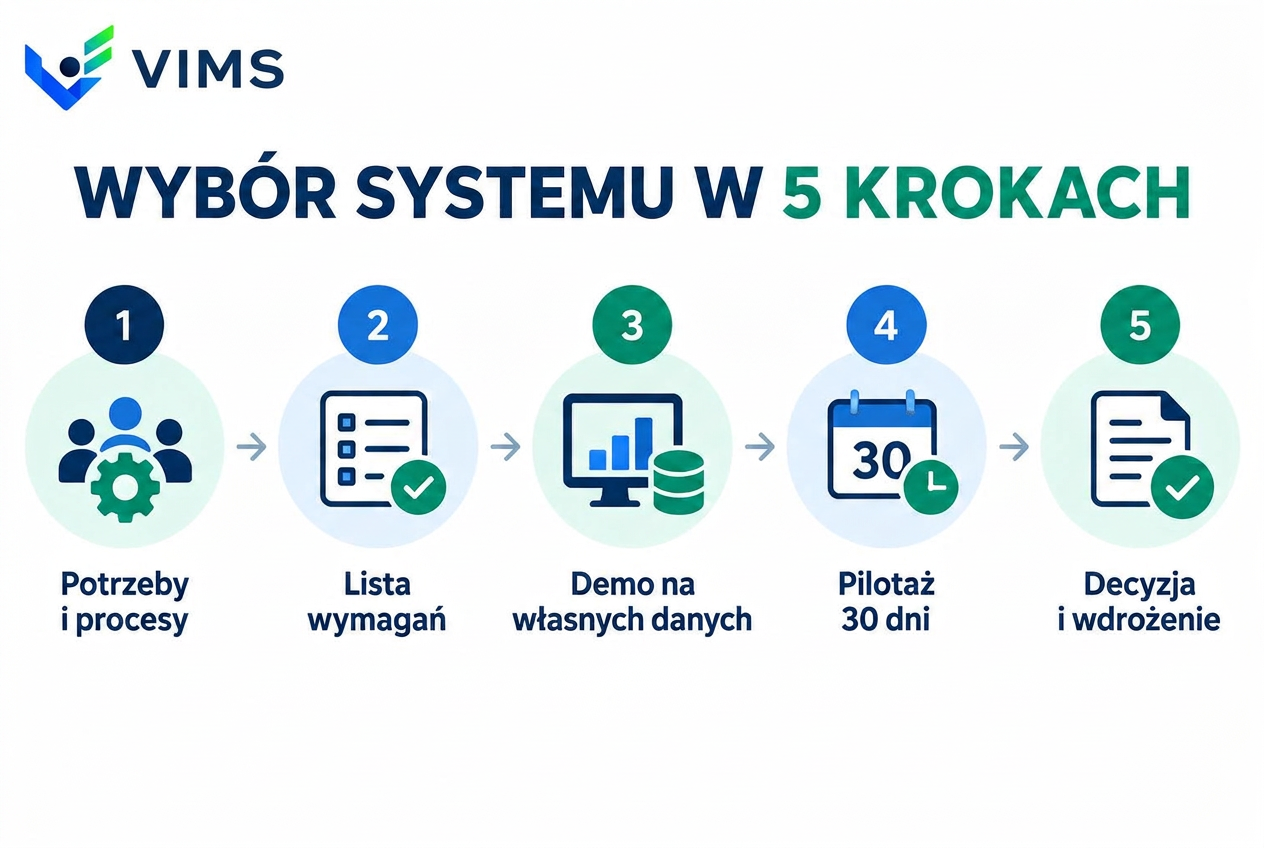
VIMS EHS — Choosing safety software: needs, requirements, demo, 30-day pilot, decision
A pilot on your own data is the best test before a purchase decision.

What else to consider before deciding?

Regardless of company size, check data security, user permissions, export of documentation, backups, personal data processing terms and the scope of technical support.

Ask about app availability on a weak connection, migrating existing registers and how additional users and modules are billed.

A short meeting with the people who will use the software daily is also a good idea. Their assessment can be as valuable as the executive demo.

Which safety program should you finally choose?

There is no single solution for every company.

If deadlines and documentation are the biggest pain, start there. If you manage safety in production, pay special attention to reporting, inspections, risk assessment and corrective actions. If you are responsible for several locations, check reporting, permissions and process integration.

Do not buy safety software because it has many features. Choose one that keeps important information from getting lost, gives every task an owner and lets decisions be made on current data.

If you are looking for modular safety software or an EHS/QHSE system, test VIMS EHS on examples from your own organisation. A 30-day trial lets you check the system on your own data.

The best way to choose safety software? See whether it handles your real problem. Before you pay for it.

Comparison worksheet — what to check

Use this table as a template to score offers. Rate each vendor from 1 to 5.

CriterionWhat to checkHow VIMS handles it
ModularityCan you buy a single module?Yes — start with one module, add more within the same organisation
Field workApp, photos, QR/NFCMobile app, QR codes and NFC tags, photo reports
DataLocation, DPA, exportData processing agreement, isolated organisation, data export
ImportSpreadsheets, PDFs, SDSAI-assisted data import, including safety data sheets
TrialPilot on your own data30 days of the full package; data stay after purchase
CostSubscription, surcharges, deploymentTransparent pricing and an online calculator

Key takeaways

  • Choose software for your company's real problems, not for the longest feature list.
  • Headcount is not the only criterion — processes and risks matter more.
  • Check whether data from one process flows into the next without retyping.
  • Test the mobile app and QR reporting in real conditions, not only in a demo.
  • Run three trials: a new employee, a shop-floor report and an unannounced audit.

Related modules

Occupational risk assessment

Risk assessment — a living document instead of a binder

Run risk assessment online: hazards, risk levels, control measures and reviews in one place, connected to what actually happens on site.

Explore the VIMS EHS module: Occupational risk assessment with AI

Workplace accidents and near misses

Accidents and incidents — the full investigation workflow without spreadsheets

Report an event in seconds, run the root cause analysis, plan actions and close the case with complete documentation in one place.

Explore the VIMS EHS module: Accident and event recording

Chemical substances and safety data sheets

Chemical substances and SDS — a live substance register instead of a binder

One substance register, current safety data sheets available from a phone and full control over what is used where on site.

Explore the VIMS EHS module: Chemical substances and SDS register

Hazard reporting

Hazard reporting — the signal from the shop floor that does not get lost

The cheapest information in a plant is the one that arrives before an accident. This module shortens the path from spotting a hazard to deciding on an action, and makes sure the reporter hears back.

Explore the VIMS EHS module: Reporting issues from a phone

Rounds and inspections

Rounds and inspections — regular presence on the floor instead of a quarterly report

A safety walkaround is a cheap prevention tool, but only when it happens regularly and ends with an assigned task. This module enforces both conditions.

Explore the VIMS EHS module: Rounds with QR and NFC codes

Smart data import and AI assistant

Smart data import and AI assistant — stop retyping your documents

The most expensive part of rolling out a safety system is not the licence; it is the weeks spent retyping employee records, medical checks, qualifications and safety data sheets. This module shortens that stage and makes sure nothing enters a register without human approval.

Explore the VIMS EHS module: AI-powered data import

Frequently asked questions

Does a small company need safety software?

Not always. A small company with simple processes and well-controlled deadlines can keep records without specialised software. Problems start when training, medical and risk assessment deadlines must be tracked regularly — then a simple records tool really helps. Headcount is not the only criterion: a small workshop with machinery and hazardous substances can have more complex needs than a much larger office company.

How does safety software differ from a safety app and an EHS system?

Safety software usually covers records, training, medicals and risk assessments. A safety app emphasises phone use — e.g. hazard reporting or access to instructions. An EHS system additionally covers environment and organisation-wide safety management, and QHSE also includes quality. These are not rigid categories — always check the actual scope.

Is Excel enough for safety documentation?

For simple, single registers — often yes. Excel gets in the way when several people are responsible for connected processes: it becomes hard to tell which file is current and whether an action was closed. Good software goes from finding to task, owner, deadline and confirmation in one place.

How much does safety software cost?

Cost depends on the scope of functions, number of users, locations and deployment terms. Check what you pay for (employees, users, locations, modules), whether deployment and import cost extra, and whether you can recover your data after the contract ends. The cheapest subscription is not always the lowest total cost. VIMS EHS offers subscription packages and an online cost calculator.

Is it worth choosing software with AI features?

AI can speed up tedious work such as extracting data from documents or preparing drafts — in VIMS EHS it supports SDS import and preparing risk assessment data. It should not be the main reason for choosing a system: AI cannot replace knowledge of real conditions, measurements or the specialist's judgement. Ask which data is sent to AI models and how it is protected.

Test VIMS EHS on your own processes

30 days of the full package, no card required. Run three simple trials: add a new employee, report a hazard from the shop floor and run an unannounced audit.